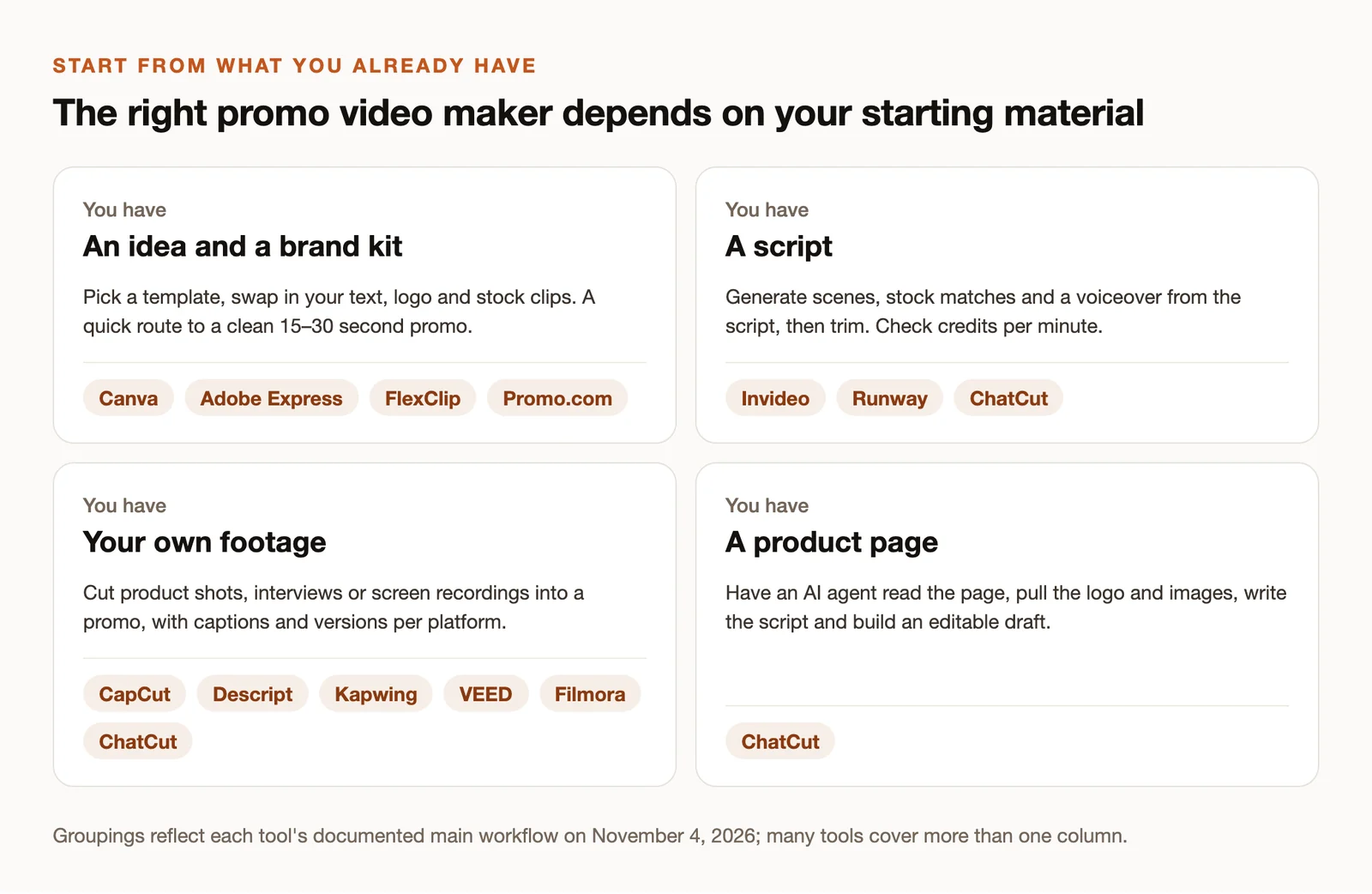
The best promo video maker is the one that starts from what you already have. If you have a brand kit and an idea, a template tool gets you to a clean 30-second promo in an hour. If you have footage, you need an editor. If you have only a product page, an AI agent can draft the whole thing for you to edit.
This guide compares 12 promo video makers by that starting point, then by what you can export for free and what you’ll pay. Every price and free-plan limit below was checked on the vendor’s own pricing or help page on November 4, 2026. Where a vendor doesn’t publish a number, we say so instead of repeating an old one.
Key Takeaways
- Pick by starting material: templates (Canva, Adobe Express, FlexClip, Promo.com), a script (Invideo, Runway), your own footage (CapCut, Descript, Kapwing, VEED, Filmora), or a product page (ChatCut).
- “Free” usually means free to create, not free to export. Several free plans watermark the file or cap it at 720p; check the final export before you plan a launch around it.
- Read the billing basis. Many “per month” prices assume a year paid up front. The table shows both where vendors publish them.
- AI generation costs credits on top of the plan in most tools, including ChatCut, Invideo and Runway.
- Whatever you use, the promo itself still needs one message, one audience and one call to action.
The Best Promo Video Makers at a Glance
| Tool | Best for | Platform | Free plan | Paid from (US) |
|---|---|---|---|---|
| Canva | Template-first brands | Web, mobile, desktop | Yes; premium elements watermarked | $18/month or $144/year |
| CapCut | Mobile and social promos | Web, desktop, mobile | Yes; clean exports with free assets | $19.99/month or $179.99/year |
| Adobe Express | Brand kits on a budget | Web, mobile | Yes; premium assets and AI tiered | $9.99/month |
| FlexClip | Quick web promos | Web | 720p, up to 10 minutes, 12 projects | $19.99/month or $143.88/year |
| Promo.com | Stock-heavy ads | Web | Create free; download limits not published | $59/user/month or $348/year |
| Invideo | Script to video | Web | Limits not published | $20/seat/month |
| ChatCut | Promos from a product page or footage | macOS, Windows, web, AI agents | Editor, captions; 60 min of cloud exports | $25/month or $252/year |
| Descript | Talking-head and screen recordings | Desktop, web | 720p with watermark | $24/month or $16/month billed annually |
| Kapwing | Collaborative browser editing | Web | 720p with watermark, 4-minute videos | $24/month or $192/year |
| VEED | Captions and translation | Web | Yes, with limits | Per seat; check current pricing |
| Runway | Cinematic AI shots | Web | 125 one-time credits | $15/month or $12/month billed annually |
| Filmora | Desktop editing | Windows, macOS | Watermarked exports | $49.99/year; $79.99 perpetual |
Prices are the vendors’ listed US prices for the cheapest relevant plan on November 4, 2026, before tax, and can vary by region, seat count and promotion.
What Is a Promo Video?
A promo video is a short video that promotes one product, offer, event or brand to a specific audience. Most run 15 to 90 seconds, and the same promo often ships in several versions: a vertical cut for Reels and Shorts, a square cut for feeds, and a horizontal cut for YouTube or a website. For ideas, see our gallery of promo video examples.
How We Chose These Tools
We started from the searches that bring readers here (“promo video maker”, “free promo video maker”, “best promo video maker”) and the tools that recur across the guides ranking for them. Then we checked each tool’s pricing page and help center for the things that decide whether it works for you: platform, free-plan export limits, watermark rules and billing basis.
This is a desk review. We didn’t run the same brief through all 12 tools, so we don’t rank output quality or speed. ChatCut publishes this guide and is one of the 12; it’s described with the same fields as everyone else.
What to Look for in a Promo Video Maker

- Your starting material. Templates, a script, footage or a URL. A tool that’s excellent at one is often awkward at another.
- What the free plan exports. Watermark, resolution, length and project caps. “Free” and “free to download” are different promises.
- Formats. You’ll want 9:16, 1:1 and 16:9 versions without rebuilding the promo three times.
- Asset licenses. Stock clips, music and AI-generated assets carry license terms. If the promo runs as a paid ad, read them.
- How you’ll pay. Monthly flexibility or an annual commitment, plus credits for AI generation.
12 Best Promo Video Makers in 2026
1. Canva: Best for template-first brands
Canva treats a promo like any other design: pick a template, drop in your logo, colors and copy, swap the stock clips, and resize for each placement. If your team already makes social graphics in Canva, the promo lives next to them with the same brand kit.
Free plan: content made with free elements exports cleanly; premium elements are watermarked on Free. Paid: Pro is $18 a month or $144 a year. Watch for: it’s a design tool first. Cutting your own footage precisely is easier in a dedicated editor.
2. CapCut: Best for mobile and social promos
CapCut runs on phones, desktop and the web, with templates, captions, effects and audio tools built for short social video. It suits promos you’ll post as Reels, TikToks and Shorts.
Free plan: basic editing and templates; exports stay clean when you use free assets, while Pro effects and some templates block export without a subscription. Paid: Pro is listed at $19.99 a month or $179.99 a year in the US; your account and region set the final price. Watch for: CapCut isn’t available in every country, and some export settings need Pro.
3. Adobe Express: Best for brand kits on a budget
Adobe Express combines templates, stock, Firefly AI generation and social scheduling across web and mobile. It’s the cheapest way to keep promos on brand if you already use Adobe fonts and assets.
Free plan: basic editing and assets; premium assets and AI features are tiered. Paid: the paid plan is $9.99 a month in the US. Watch for: Adobe doesn’t publish universal free-plan export limits, so export a test first.
4. FlexClip: Best for quick web promos
FlexClip is a browser editor with promo templates, stock media and AI tools. It’s straightforward for a first promo with no editing background.
Free plan: exports up to 720p, videos up to 10 minutes and 12 projects, with one stock video and one stock audio clip per project; going beyond the plan adds a watermark. Paid: $19.99 a month, or $143.88 a year ($11.99 a month); Plus exports 1080p. Watch for: the free plan is best for drafts and small posts, not for an HD launch.
5. Promo.com: Best for stock-heavy ads
Promo.com is built around ready-made video ads and a large stock library, with branding, AI features and social publishing.
Free plan: free creation is advertised; download limits aren’t published on the pricing page. Paid: $59 per user per month, or $348 a year ($29 a month). Watch for: check the stock license for your placement before running a paid campaign; don’t assume every clip is cleared for every use.
6. Invideo: Best for script to video
Invideo turns a script or prompt into a draft with stock matches, voiceover and a timeline you can edit, with AI agents and multiplayer editing.
Free plan: current free-plan export limits aren’t published on the pricing page. Paid: Starter is $20 per seat per month, with a promotional $10 a month on annual billing when we checked, and includes 400 credits a month that don’t roll over. Watch for: generation consumes credits, so a few rewrites of a long video add up.
7. ChatCut: Best for promos from a product page or footage
ChatCut is an AI video editor where you describe the promo and an agent builds it on an editable multi-track timeline. It works from either end: give it a product page and it reads the page, pulls the logo and images, writes a script and assembles a draft with motion graphics and music; give it your own footage and it cuts, captions and versions it.
You can see real outputs from prompts like this in the AI ad examples. ChatCut runs as a desktop app for macOS 13+ and Windows 10+, a web app, and a plugin for Claude Code and Codex.
Free plan: the editor, transcription, captions and up to 60 minutes of cloud exports in total. Paid: $25 a month or $252 a year, with 100 credits a month; AI video generation requires a paid plan. Watch for: agent requests and generation use credits, and you’ll still want to review the script and every generated shot before publishing.
8. Descript: Best for talking-head and screen recordings
Descript edits video by editing the transcript, which makes it fast for founder videos, product walkthroughs and screen recordings. It adds filler-word removal, Studio Sound and an AI co-editor.
Free plan: 720p exports with a watermark and limited media minutes each month. Paid: Hobbyist is $24 a month, or $16 a month billed annually, with watermark-free 1080p. Watch for: media minutes and AI credits are separate allowances.
9. Kapwing: Best for collaborative browser editing
Kapwing is a browser editor with captions, recording, templates, resizing and shared workspaces, good for small teams reviewing the same promo.
Free plan: 720p exports with a watermark, videos up to four minutes, and a monthly export allowance. Paid: Pro is $24 a month or $192 a year ($16 a month), removing the watermark and supporting 4K. Watch for: brand kits are a paid feature.
10. VEED: Best for captions and translation
VEED is an online editor known for subtitles, translation, brand kits and team editing, with AI clipping for longer recordings.
Free plan: available with export limits. Paid: billed per seat; VEED’s pricing page didn’t show readable amounts when we checked, so confirm the current price before you budget. Watch for: transcription and translation cover different language lists, so check yours.
11. Runway: Best for cinematic AI shots
Runway generates and transforms video, images and audio with its own models. It’s the tool to reach for when a promo needs a shot you can’t film.
Free plan: 125 one-time credits. Paid: $15 a month, or $12 a month billed annually. Watch for: Runway generates shots; you’ll still assemble, caption and time the promo in an editor.
12. Filmora: Best for desktop editing
Filmora is a desktop editor for Windows and macOS with a friendly timeline, motion tracking, keyframes, screen recording and AI text and audio tools.
Free plan: exports carry a watermark. Paid: Basic is $49.99 a year, or $79.99 for a perpetual license; some AI features and creative assets cost extra. Watch for: Wondershare’s Mac storefront showed different prices from its main storefront when we checked, so confirm the price for your platform.
Also considered
- Lumen5 turns articles into videos, but its current prices weren’t available on its official pricing page when we checked.
- Colossyan makes avatar-led training and explainer videos; its free Starter plan includes a monthly allowance, and paid downloads start on the Professional plan.
- Animoto, Powtoon and Vyond appear in many lists; they’re strongest for slideshow-style and animated explainers rather than footage-based promos.
How to Make a Promo Video
The tool matters less than these four steps. They work in any editor on this list.
1. Write one message for one audience
Before opening a tool, finish this sentence: “For [audience] who [problem], [product] [result]. [Action].” That’s your script’s spine: problem, solution, call to action. For a fictional task app, it might read: “For freelancers who lose track of client requests, Taskly turns every email into a dated to-do. Start free today.”
Keep it short. Write the 15-second version first; a good 15-second idea can stretch to 60, but a 60-second idea rarely survives being cut to 15.
2. Choose your visuals
You have three sources, and most promos mix them:
- Your own footage. The product in use, the founder, the team, the screen. A phone, window light and a clear microphone are enough.
- Licensed stock. Fast for mood and context. Check the license for paid ads.
- Generated shots. Useful for scenes you can’t film. Generation costs credits, and you should review every shot for errors in hands, text and product details.
3. Assemble and review the draft
Put the hook in the first two seconds: the result, the problem or the product itself, not a logo animation. Add captions, because many people watch with the sound off. Then watch the whole promo once as a stranger would and cut anything that doesn’t serve the one message.
In an AI editor you can ask for this pass directly:
4. Export for each placement
Export a vertical 9:16 version for Reels, TikTok and Shorts, a square or 4:5 version for feeds, and a horizontal 16:9 version for YouTube and your site. Open each final file before publishing: check for a watermark, the resolution, cut-off captions, and audio levels.
Which Promo Video Maker Is Right for You?
- You’re a small brand with a brand kit and no footage: Canva, Adobe Express or FlexClip.
- You post mainly to Reels, TikTok and Shorts: CapCut.
- You need lots of stock and ready-made ad formats: Promo.com.
- You have a script and want a draft fast: Invideo, with Runway for hero shots.
- You have footage of people talking or screen recordings: Descript or ChatCut.
- You have a product page and want an editable draft from it: ChatCut.
- A team reviews every promo in the browser: Kapwing or VEED.
- You want a desktop editor with a one-time price: Filmora.